CleanLink
Strip tracking parameters from any URL. One tap. No cloud, no accounts.
LiveSee it in action
App Preview
Features
Cleaned on your device
Your link is cleaned on your device and never sent to us. No accounts, no analytics, no ads.
Share Sheet Integration
Clean links directly from any app's share menu. Copy, clean, paste.
Automatic Detection
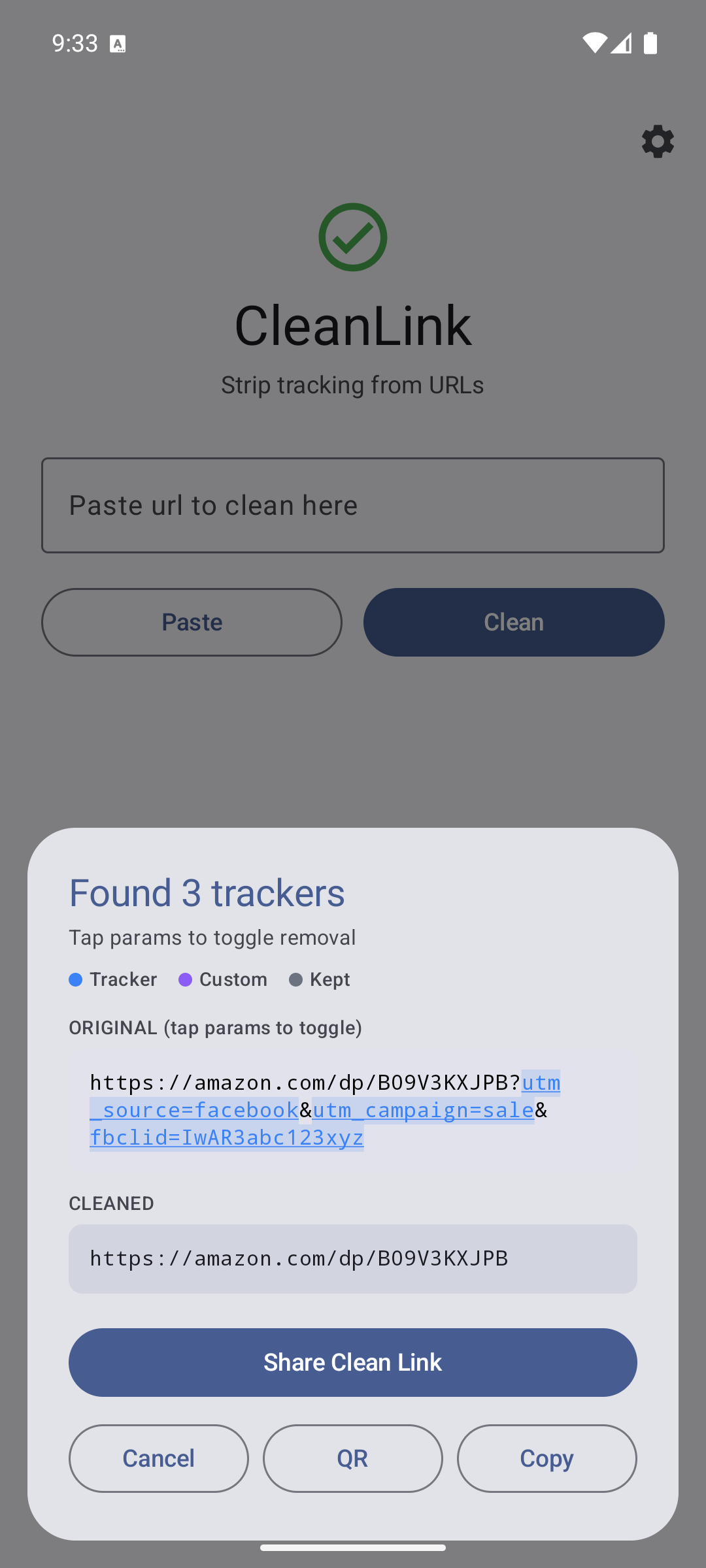
Recognizes 100+ common tracking parameters from Meta, Google, TikTok, HubSpot, affiliate networks, and more.
Tracking parameters we strip
How it works
Share or Paste
Share a link to CleanLink from any app, or paste it directly.
Instant Clean
Tracking parameters are identified and stripped in milliseconds.
Copy & Share
Your clean URL is ready to share without revealing where you got it.
Web or native?
Both work. Native is where CleanLink actually shines.
Web
Paste-and-clean, no install. Fine for the occasional link on a desktop. Won't help you clean the link a friend just texted you — that's a native-only trick.
Native Recommended
Adds CleanLink to your phone's share sheet. Tap "Share" on any tweet, DM, or Instagram post → CleanLink → get the clean version back, ready to send on. The web app can't intercept a share; the native one can.
Privacy
Short version: CleanLink cleans your links on your device and does not collect anything about you. The iOS and Android apps use the network in two narrow cases, both spelled out under Network activity below. This section is the long version and it is the official privacy policy for the CleanLink apps on iOS, Android, and the web.
What CleanLink does
You give CleanLink a URL — by pasting, or by sharing one to it from another app. CleanLink removes known tracking parameters from that URL and hands the clean version back to you. That is the entire product.
What we collect
Nothing about you. CleanLink has no accounts, no sign-in, no analytics, no crash reporting, no telemetry, and no advertising SDKs. We do not know how many times you use the app or which links you clean.
The one thing the iOS and Android apps can send us is a tracker report: the name of a tracking parameter and the hostname of the site it appeared on. It is described under Network activity below, and it carries nothing that identifies you.
Where your links go
Not to us. The tracker-stripping logic runs entirely on your device. The list of parameters to strip ships inside the app binary itself. Your URLs are never transmitted to ez2bgood.
One exception, in the iOS and Android apps: a link from a URL shortener (bit.ly, t.co and similar) cannot be cleaned until the app knows where it leads. So the app asks the shortener, directly from your device — the same request your browser would make if you opened the link. It does not pass through any ez2bgood server.
The web version of CleanLink at cleanlink.ez2bgood.com works the same way: the stripping happens in your browser, in JavaScript, without a round-trip to the server. You can verify this in your browser's DevTools Network tab — it will be silent when you paste a link.
Permissions the apps request
- Clipboard access — so you can paste a link in and copy the cleaned link back out. Used only when you tap paste or copy.
- Share Extension registration — so "CleanLink" appears in your system share sheet. When another app shares a URL to CleanLink, only that URL is passed to CleanLink; nothing about the source app.
CleanLink does not request location, contacts, camera, microphone, photos, or notifications.
Network activity
Removing trackers from a link never touches the network. The iOS and Android apps use the network in two cases only:
- Short links — when the link you are cleaning comes from a known URL shortener, the app sends a request straight to that shortener to find the link's destination, then cleans the destination. The shortener sees that request, as it would if you opened the link.
- Tracker reports — when you mark a parameter CleanLink does not yet recognize as a tracker (by reporting it from the parameter breakdown, by adding a custom rule with reporting switched on, or by tapping a parameter on CleanLink's share-sheet screen), the app sends that parameter's name and the site's hostname to
cleanlink.ez2bgood.comso it can be added to the built-in list. It does not send the link, the parameter's value, or any user or device identifier. We store the name, the hostname, and a count of how often that pair has been reported.
As with any request to any web server, ours sees the IP address a tracker report came from. We do not store it with the report.
The apps and web page also load their own UI (icons, static assets) from ez2bgood servers over HTTPS, and if you tap a link inside the app to visit a page, your operating system opens it in your default browser — at which point normal browser network activity applies.
Children
CleanLink is safe for all ages. It collects nothing that identifies anyone, children included.
Third parties
None. CleanLink does not integrate any third-party SDKs for analytics, advertising, attribution, crash reporting, or A/B testing.
Changes to this policy
Corrected 2026-10-06. The earlier version of this page said CleanLink never used the network, and described short-link expansion as a possible future, opt-in feature. That was wrong: short-link expansion and tracker reports were already in the iOS and Android apps. This version describes what the apps actually do.
If we add anything else that sends data off your device, we will update this page first. Cleaning a link on your device, without sending it to us, will remain how CleanLink works.
Contact
Questions or concerns: admin@ez2bgood.com.
Effective 2026-10-06. Publisher: ez2bgood llc.
Get it
Web works everywhere. Native gets the share sheet.